An iPhone spyware warning from Apple does not mean the phone has been hacked. It means Apple has high confidence that the user may be individually targeted by mercenary spyware, a costly kind of surveillance software aimed at a very small number of specific people. Apple calls the message a Threat Notification. Thailand's Ministry of Digital Economy and Society (DES) and the National Cyber Security Agency (NCSA) met Apple on 11 November 2026 after some iPhone users in Thailand received the alert, and both bodies have addressed the issue publicly.
The news has worried many iPhone owners and has given scammers a chance to send fake warnings. Below is what the alert means, how to tell a real one from a fake, and what to do if you get one.
How Apple sends real spyware warnings
According to Apple Support, if Apple detects activity consistent with a mercenary spyware attack, it notifies users only through set channels. The lists below compare what Apple really uses with what it never asks for.
Apple notifies users through:
- A notification on the iPhone itself, shown on the lock screen and in the Settings app
- An email to the address linked to the user's Apple Account
- A banner at the top of the Apple Account page after signing in at account.apple.com
Apple never asks users to:
- Tap a link in a message or email
- Open a file
- Install an app or a profile
- Give a password or a verification code by email or phone
If you are not sure a message is genuine, open Settings on your phone. Then type account.apple.com into your browser yourself and check whether a warning banner is actually there. Do not tap any link in the message you received.
The NCSA warns of fake messages that urge people to tap links, install apps or hand over codes. It says these are scams riding on the news. Delete or ignore them, and do not reply.
A warning does not mean your phone was breached
Apple describes the alert as a high-confidence warning that a user is being individually targeted. Its investigation cannot be 100% certain, so Apple says to treat the alert as serious. Apple does not reveal what triggered the alert, because that could help attackers avoid detection. It also does not say who is behind the attacks or in which region they happen.
Chaichanok Chidchob, the Minister of Digital Economy and Society, said after the meeting that receiving a warning does not mean a device has been hacked or breached. He said there is no confirmation that the matter is linked to Pegasus spyware. Maj Gen Teerawut Witthayakorn of the NCSA said the same: a device that received a warning may not have been compromised.
If you did not receive a warning, Apple says most users will never face this kind of attack. Mercenary spyware costs millions of dollars, can be used only for short periods and is aimed at very few people. These are often journalists, activists, politicians and diplomats. Such attacks are far more sophisticated than ordinary online scams.
The figure of 150 countries needs context. Apple's page says it has sent warnings several times a year since 2021 and has so far notified users in more than 150 countries. That is a cumulative total over several years. It is not a single wave of alerts sent to every country at once.
What to do if you get a genuine warning
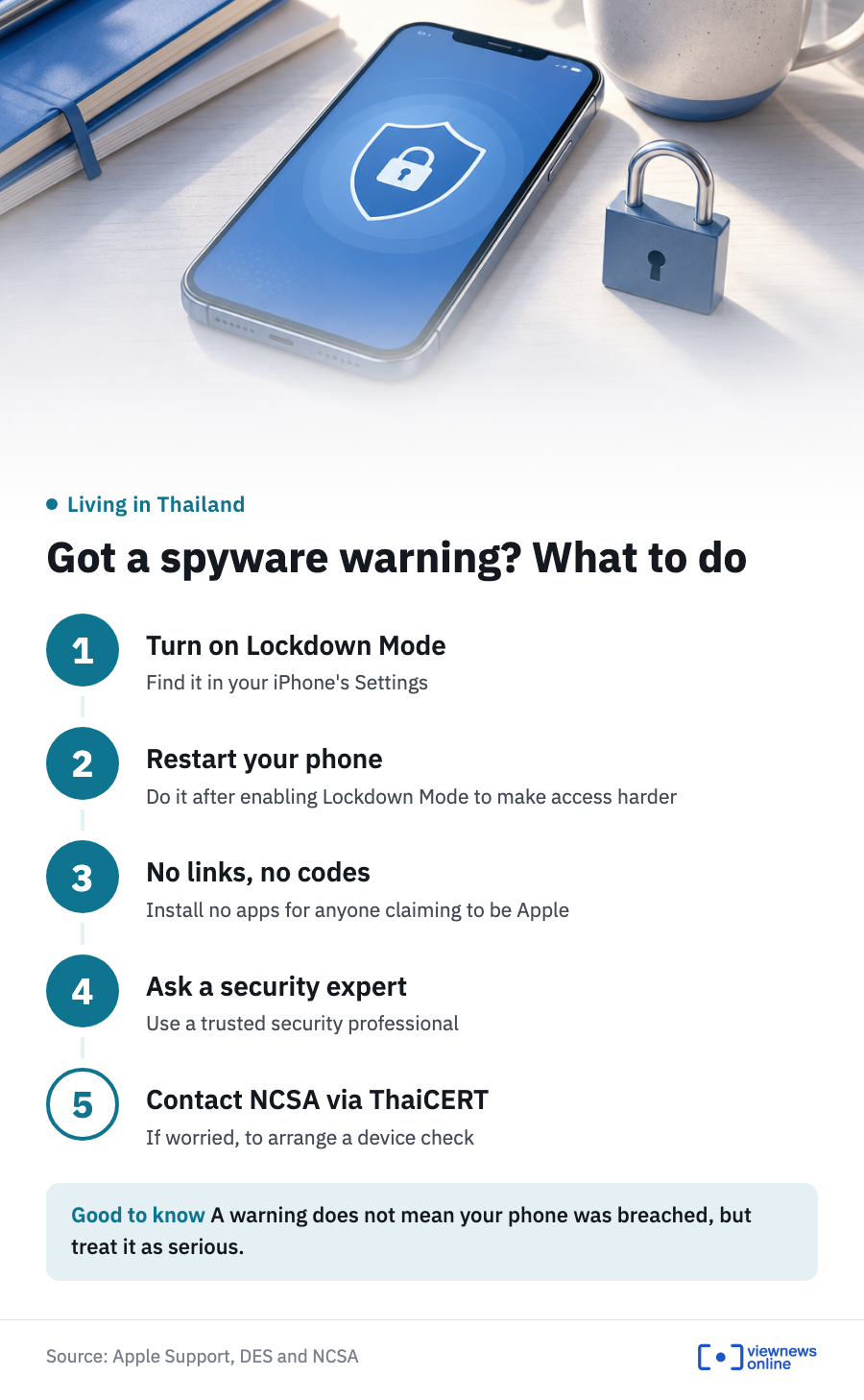
Apple advises recipients to use extra protections and to seek expert help. The DES minister said that turning on protection still helps even after a warning has arrived. You can do the following right away:
- Turn on Lockdown Mode in your iPhone's Settings
- Restart the phone after turning on Lockdown Mode
- Do not tap links, install apps or give codes to anyone claiming to be from Apple
- Ask a trusted security expert for help
- If you are worried, contact the NCSA through ThaiCERT to arrange a check of your device
The minister explained that this type of spyware needs constant access to the phone. Turning on Lockdown Mode and then restarting the device makes it harder to reach.
If you would rather not involve a government agency, you can use a trusted outside provider instead. The NCSA says there are tools that analyse past traces on a device. These look for unusual software installs or spyware, connections to an attacker's command and control (C2) servers, and the destination IP addresses the device has contacted. The aim is to judge whether there are signs of an attack or of data being sent out.
The scope and results of a check depend on the logs and evidence still on the device. If evidence has been deleted or is missing, the results may be incomplete. If you receive a genuine warning, do not put off a check for long.
Latest from DES and the NCSA
DES and the NCSA met Apple executives on 11 November 2026, following a meeting of the National Security Council. The Prime Minister has stressed the importance of global cyber threats and told DES and related agencies to assess the situation quickly and set response measures.
The DES minister said Apple will provide more information to the public in Thailand about the situation and how to protect themselves. Apple has not said how many people in Thailand received the warning.
DES and the NCSA plan to widen talks to platform, software, hardware and telecom operators to share information on attack patterns and on working with the government. They will also consider how to deal with threats on Android, which was outside the scope of this meeting with Apple. All of this is still at the planning stage and no conclusions have been reached. Users should keep watching announcements from DES, the NCSA and Apple.
Source: Apple Support's page "About Apple threat notifications and protecting against mercenary spyware", and statements from the Ministry of Digital Economy and Society and the National Cyber Security Agency.
This article is adapted from ViewNews' Thai-language report.